Valentine Newspaper Canva Template: A Vintage-Inspired Design Toolkit
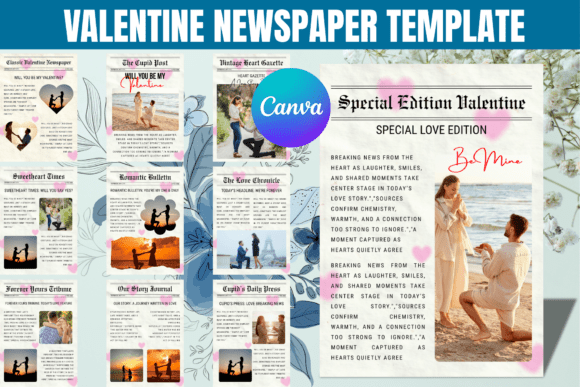
The Valentine Newspaper Canva Template bundle offers a distinct alternative to typical romantic graphics. It leverages the familiar, structured format of a newspaper to create a unique visual narrative for love notes, announcements, or seasonal marketing. This collection of ten editable designs provides a blend of nostalgic charm and modern flexibility, ideal for those seeking a heartfelt, vintage-inspired aesthetic without requiring advanced design skills.
Visual Style and Core Personality
At its heart, this template kit embodies the editorial design principles of a classic newspaper, reimagined for Valentine's Day. The visual language is characterized by a multi-column layout, structured headlines, and designated areas for articles and photos. The overall personality is romantic, sentimental, and cleverly nostalgic. It avoids the overtly saccharine look of many Valentine's products, instead offering a more sophisticated, story-driven approach. The style is reminiscent of vintage "Cupid Post" bulletins or love-themed broadsheets, making it perfect for packaging design, gift wraps, or bouquet cards that tell a story.
Each template within the bundle is a drag-and-drop design asset, fully customizable within Canva. This means you can adapt the display font headlines, body text, images, and color scheme to match your specific project's needs. The inherent structure provides a strong visual hierarchy, guiding the viewer's eye from the main headline to supporting details, which is crucial for effective editorial design and marketing collateral.
Practical Applications Across Creative Projects
The versatility of the Valentine Newspaper Canva Template extends far beyond a simple love letter. Its structured format makes it a powerful design asset for a variety of projects:
- Personal Gifts & Proposals: Craft a unique "Will You Be My Valentine?" proposal or a personalized anniversary newspaper detailing your relationship's milestones.
- Small Business Marketing: Create eye-catching social media graphics, promotional flyers, or in-store signage for Valentine's Day sales and events. The format is excellent for presenting multiple offers or product features in an organized, engaging way.
- Digital & Print Publishing: Bloggers and content creators can use the templates to design featured images, printable inserts, or digital magazine layouts that stand out with a vintage flair.
- Brand Identity & Packaging: For brands with a vintage, artisanal, or literary personality, these templates can inspire logo design elements or directly serve as part of seasonal packaging design, like wrapping paper or product tags.
- Crafting & DIY Projects: The templates are noted for compatibility with Cricut Design Space and Silhouette Studio, making them ideal for creating custom decals, stencils, or paper crafts.
Influence on Readability and Brand Perception
Choosing a template like this is a strategic brand identity decision. The newspaper aesthetic immediately communicates a sense of thoughtfulness, effort, and a classic, timeless quality. For a business, it can position the brand as creative and detail-oriented. For personal use, it elevates a simple message into a keepsake.
The built-in typography—often pairing a bold serif font or display font for headlines with a clean sans serif font for body copy—ensures readability while maintaining stylistic cohesion. This font pairing creates a clear hierarchy, making the information easy to digest. When customizing, it's vital to maintain this balance. Swapping fonts requires careful consideration of x-height, weight, and spacing to preserve the design's professional readability and overall consistency.
Guidance for Selecting and Using the Template
Before diving in, evaluate if this creative font style and editorial layout align with your project's tone. It's perfect for romantic, vintage, or narrative-driven themes but may not suit ultra-modern or minimalist brands. Here’s a practical approach:
- Assess the Fit: Review all ten designs in the bundle. Look for the layout that best accommodates your amount of text and imagery. Consider if the vintage-inspired style complements your existing brand identity.
- Test Your Content: In Canva, plug in your actual headline, subheadings, and body copy. Does the text flow well? Are the placeholder articles and captions flexible enough for your message? Check that your photos work within the designated frames.
- Evaluate Font Pairings: While the templates come with pre-selected fonts, you may want to customize. Use Canva's font search to find complementary typefaces. A script font or handwritten font can add a personal touch to a byline or pull quote, but use it sparingly to avoid clutter.
- Review Commercial Use: The templates are designed for broad use, including commercial projects. However, always verify the specific licensing terms provided with your purchase, especially for any premium font or graphic elements included, to ensure compliance for commercial font usage in logos or merchandise.
- Test Outputs: Download a test file in your intended format (PNG for social media, PDF for print). Check the resolution and color fidelity. For craft projects, SVG is often the preferred format for cutting machines.
The Valentine Newspaper Canva Template is more than a collection of design assets; it's a framework for storytelling. By understanding its visual language and applying it thoughtfully, you can create communications that are not only beautiful but also deeply engaging, turning a simple Valentine's greeting or promotional campaign into a memorable piece of modern typography and design.