Editable Pouch Label Canva Template 2 for Packaging Design
Designing packaging that looks truly professional often feels like a bottleneck for small business owners. You might have a fantastic product—whether it’s loose leaf tea, hand-poured candles, or artisanal spices—but getting that product into a visually appealing pouch usually requires expensive software or hiring a freelancer. This is where the Editable Pouch Label Canva Template 2 steps in to bridge the gap between your vision and the shelf. It is built specifically for entrepreneurs who need high-end design results without the steep learning curve of programs like Adobe Illustrator or Photoshop.
Why This Template Stands Out
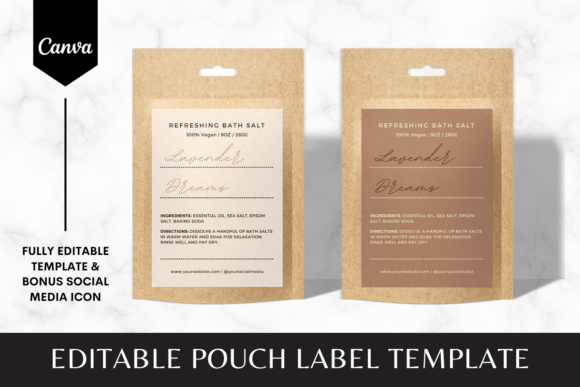
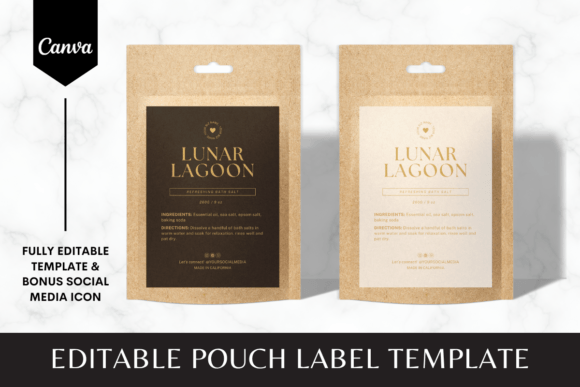
The visual personality of the Editable Pouch Label Canva Template 2 is rooted in versatility and modern aesthetics. It isn't a rigid, one-size-fits-all graphic; rather, it functions as a robust framework for your brand identity. The layout is clean, offering plenty of negative space which is crucial for readability on smaller items. It balances typography and imagery effectively, ensuring that your product name acts as the hero element. This packaging design asset avoids clutter, focusing instead on a structured hierarchy that guides the customer's eye naturally from the logo to the essential product details.
For many creators, the biggest hurdle in graphic design is maintaining consistency. This template solves that by providing a cohesive structure that can be adapted across different product lines. If you are launching a new skincare range or a series of spice blends, the template allows you to swap out colors and fonts to create distinct sub-brands while keeping the overall visual language unified. This is vital for building brand recognition on a crowded shelf or in a busy online store.
Practical Applications for Dynamic Businesses
When we talk about where this asset works best, the answer lies in its adaptability for digital and print environments. Because it is delivered as a Canva link, it is inherently optimized for digital workflows. You can tweak a label for a specific seasonal promotion, export it as a print-ready PDF, and send it to your printer in minutes. However, the utility extends far beyond physical goods.
Consider the needs of a content creator or a blogger. The visual style of the Editable Pouch Label Canva Template 2 translates beautifully to social media graphics. The same design principles used for your physical label can be repurposed for Instagram posts or Pinterest pins to promote your product. This ensures visual consistency between what a customer sees online and what they hold in their hands. The inclusion of over 60 social media icons (in PNG and SVG formats) makes this integration even smoother, allowing you to maintain a professional aesthetic across all platforms without hunting for separate assets.
Furthermore, the template supports a variety of typeface combinations. While the template provides a suggested layout, you are encouraged to experiment with font pairing. You might choose a bold sans serif font for the product title to convey strength and clarity, paired with a delicate script font for the descriptor to add a touch of elegance. This flexibility allows you to tailor the visual hierarchy to match the specific personality of your product, whether it is rugged and organic or sleek and modern.
Customizing for Maximum Impact
Getting the most out of the Editable Pouch Label Canva Template 2 requires a strategic approach to customization. It is not just about changing the text; it is about aligning the design with your market positioning. Here are a few practical recommendations for evaluating the fit and testing your designs:
- Color Psychology: Use the template’s color blocks to test different palettes. If you sell organic teas, earth tones and muted greens often signal natural ingredients. For tech accessories or modern cosmetics, high-contrast monochromes can suggest precision and luxury.
- Readability Testing: Since these labels often appear on pouches that may be viewed from a distance or in low light, test your font choices for legibility. A highly decorative display font might look great on a computer screen but can become illegible when printed small. Ensure your body copy uses a clean serif font or sans serif font that remains crisp at smaller point sizes.
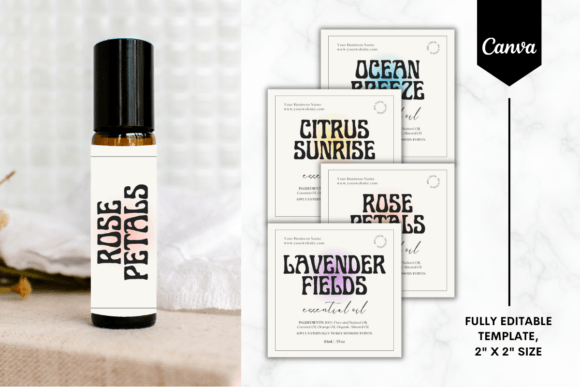
- Size Adaptability: The package includes three sizes (3"x3", 3"x4", and 4"x5"). Do not assume one size fits all. A 3x3 label is square and requires a very different composition than a 4x5 vertical label. Test your logo placement within these different aspect ratios to ensure it doesn't get crowded or lost.
Technical Workflow and Efficiency
One of the most significant advantages of using a premium font or template system within Canva is the efficiency it brings to your workflow. The Editable Pouch Label Canva Template 2 eliminates the need to manage complex file types or worry about software compatibility. You receive a PDF with a direct link, meaning you can access your design assets from any computer with a free Canva account.
This accessibility is a game-changer for small business owners and entrepreneurs who often wear many hats. You might be the product developer, the marketer, and the shipping manager all at once. Having a design asset that simplifies the editorial design process allows you to focus your energy on other areas of the business. It removes the friction of "figuring out the software" and lets you focus on the creative strategy.
It is important to remember that this is a digital product intended for Canva specifically. While it is tempting to want to move files into other programs, the strength of this template lies in its native Canva functionality. This ensures that the layout grids, spacing, and layering remain intact. By staying within the Canva ecosystem, you ensure that the professional finish of the design is preserved, giving your product the polished look it deserves.
Strategic Brand Growth
Ultimately, the goal of any packaging design is to communicate value instantly. The Editable Pouch Label Canva Template 2 provides the scaffolding to build that perceived value. It helps you move away from generic, amateurish labels and toward a cohesive brand identity that builds trust with your audience. Whether you are a crafter selling at local markets or a digital creator launching a merchandise line, the ability to produce professional-grade labels quickly is a significant competitive advantage. By leveraging this template, you ensure that your product not only tastes or works great but also looks the part.