Canva Template Notebook/Journal Cover17: Your Design Shortcut
Staring at a blank canvas can be paralyzing. You know the feeling—you have a brilliant concept for a notebook or journal, but the execution feels overwhelming. This is where the right design asset becomes invaluable. The Canva Template Notebook/Journal Cover17 isn't just another template; it's a strategic starting point designed to bridge the gap between your idea and a polished, market-ready product. It's built for creators who value both efficiency and a distinct, professional aesthetic.
A Design That Stands Apart
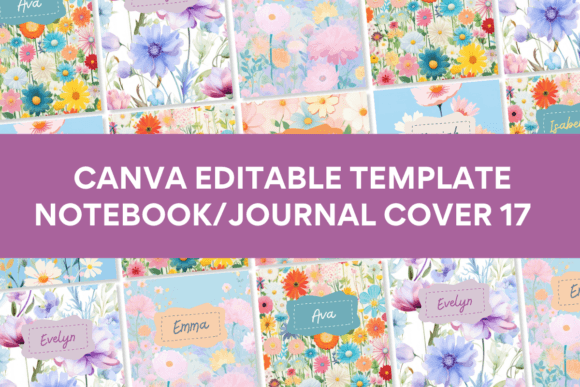
What immediately sets this template collection apart is its curated visual language. The illustrations, design elements, and backgrounds are largely original, crafted outside the standard Canva library. This means your finished cover won't carry the telltale marks of a generic, overused template. The style leans into a modern, clean aesthetic with thoughtful touches of whimsy—think elegant line art, sophisticated botanical motifs, and balanced compositions that feel both inviting and professional. The overall personality is one of refined creativity, making it versatile enough for a mindfulness journal, a business planner, or a stylish recipe book.
The template provides ten distinct front cover designs within the 8 x 11 inch format, a standard size that's both printable and practical. This variety is key; it allows you to explore different visual directions within a cohesive style family, ensuring your final choice feels intentional and aligned with your project's core message.
Practical Applications Across Industries
This is where the Canva Template Notebook/Journal Cover17 truly demonstrates its value. For small business owners and entrepreneurs, it's a rapid prototyping tool. If you're launching a line of planners or journals for your brand, you can use these templates to create mockups, test market interest, or produce your first small batch without a hefty design investment. The clean, modern typography and balanced layouts inherently support a strong brand identity, projecting consistency and professionalism from the first glance.
For designers and content creators, it serves as a foundational design asset. You can deconstruct the templates to understand successful composition, use them as a base for more complex editorial design projects, or adapt them for packaging design elements. The included styles work beautifully for social media graphics promoting your product—maintaining visual consistency from the physical product to its digital marketing.
Even for personal projects, the benefit is tangible. Creating a family recipe book, a personal growth journal, or a gift for a friend becomes an achievable, enjoyable process. The template handles the heavy lifting of layout and aesthetic harmony, freeing you to focus on the personal content that makes it meaningful.
Making It Your Own: A Guide to Effective Use
The true power of any template is unlocked through thoughtful customization. Here’s how to approach the Canva Template Notebook/Journal Cover17 to ensure it works perfectly for your goals.
- Evaluate the Fit: Before you edit, look at the ten designs. Which one's personality best matches your project's tone? A minimalist design suits a professional business journal, while a more ornate illustration might be perfect for a creative writing notebook. Don't force a style; choose the one that feels like a natural extension of your content.
- Master the Edit: The template is engineered for ease of use. All text is editable, and most graphic elements can be repositioned, recolored, or resized. Start with your title and subtitle. Then, adjust the color palette to match your brand or personal preference. A simple color shift can dramatically alter the mood from professional to playful.
- Consider Readability and Hierarchy: A cover has one job: to communicate clearly and attract. Ensure your title is the most prominent element. Use the template's existing structure for visual hierarchy as a guide. If you add elements, do so sparingly to avoid clutter. The goal is a clean, readable cover that works at thumbnail size online and in hand.
- Test Font Pairings: While the template includes suggested fonts, you are not locked in. Canva's vast library allows for experimentation. When swapping fonts, a good rule is to maintain contrast—a serif font for the title paired with a clean sans serif font for the subtitle often works well. However, always prioritize legibility over trendy modern typography.
- Understand the Licensing: This is crucial for commercial use. The template itself is licensed for your use, but the fonts and some graphic elements within Canva have their own licenses. For most small business and print-on-demand projects, you are covered, but it's always wise to review Canva's licensing terms for your specific use case, especially for large-scale distribution.
From Template to Tangible Product
The final step is bringing your design to life. The template's 8 x 11 inch size is ideal for standard printing. When you're ready to print, either for yourself or for customers, ensure you export your final design as a high-quality PDF. This preserves the resolution and color integrity. For those running a print business, this template streamlines your workflow, allowing you to offer a range of professionally designed covers without starting from scratch each time.
The Canva Template Notebook/Journal Cover17 is more than a shortcut; it's a professional toolkit. It provides the structure and style so you can focus on what you do best—creating meaningful content and building a recognizable brand. It proves that great design doesn't have to be complicated or exclusive; it just needs to be smart, adaptable, and ready to work as hard as you do.