Streamline Your Visuals with an Editable Brand Board Template
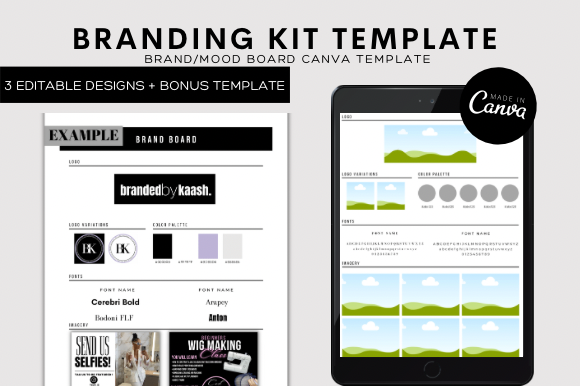
In the fast-paced world of digital marketing and design, consistency is often the difference between a forgettable business and a recognizable brand. However, achieving that consistency usually requires expensive software or advanced graphic design skills. This is where the Editable Brand Board Template steps in as a game-changer. It serves as a centralized visual guideline, often referred to in the industry as a "mini brand guide" or "style guide." Think of it as the DNA of your visual identity, condensed onto a single page. This file is a 100% editable digital asset designed to map out your color palette, typography, logo variations, and brand patterns in one cohesive layout. Unlike a static PDF, this template is a living document that you can modify instantly. It is built specifically for those who need professional results without the steep learning curve of complex design software like Adobe Illustrator or InDesign.
The Power of Canva and Modern Accessibility
One of the most significant advantages of this design asset is its integration with Canva. The modern design landscape has shifted heavily toward web-based platforms, and Canva stands at the forefront of this revolution. This template leverages that ecosystem perfectly. You do not need to install heavy software or worry about compatibility issues between Mac and PC. Whether you are working on a desktop computer, a tablet, or even your phone, you can access and edit your Editable Brand Board Template seamlessly. The interface relies on a drag-and-drop mechanism that feels intuitive, even to those who don't consider themselves designers.
It is important to note that this is a digital file only. There are no physical materials to ship; you receive a PDF containing a direct link to the template immediately after purchase. Once you click that link, the template is copied to your Canva account. From there, the customization options are vast. You can utilize the free version of Canva to make these changes, making it an incredibly cost-effective solution for startups and small businesses. The process is designed to save you significant time. Instead of building a brand board from scratch—which involves aligning elements, choosing fonts, and formatting grids—you simply swap out the placeholder content with your own. You can change fonts to match your specific brand identity, upload your own photography or use stock photos provided by the platform, and adjust the color hex codes to match your logo.
Visual Hierarchy and Brand Perception
Why does a brand board matter so much? The answer lies in visual hierarchy and brand perception. When a potential client visits your website or social media profile, they make a judgment about your business within seconds. A cohesive brand board ensures that every touchpoint—from your social media graphics to your email headers—looks unified. This template helps you define your primary and secondary typefaces. For example, you might choose a bold display font for headers to grab attention, paired with a clean sans serif font for body text to ensure readability.
The Editable Brand Board Template allows you to experiment with these pairings before applying them to larger projects. You can test how a script font interacts with a modern typography style, or how a serif font adds authority to a handwritten font. This visual testing ground helps influence how your audience perceives your professionalism. If your typography is chaotic or your colors clash, it signals a lack of attention to detail. Conversely, a well-organized brand board signals trustworthiness and competence. It is a tool that bridges the gap between amateur design and professional branding.
Practical Applications Across Industries
The utility of this template extends far beyond just making things look pretty. It is a functional tool for logo design, packaging design, and web design. For entrepreneurs and small business owners, having a brand board simplifies the process of briefing new designers or printers. Instead of sending scattered files and vague instructions, you send the brand board, and the creative direction is immediately clear.
Here are a few specific scenarios where this asset proves invaluable:
- Content Creators and Bloggers: Use the board to maintain a consistent aesthetic across your blog layout, Pinterest pins, and Instagram stories. It ensures your audience recognizes your content instantly in a crowded feed.
- Marketing Agencies: Use the template to present brand concepts to clients. It organizes design assets in a digestible format that clients can understand, speeding up the approval process.
- Wedding Planners and Crafters: For those in the event space, a brand board helps define the mood of a project, whether it's a rustic wedding theme or a modern craft portfolio. It acts as a mood board that guides all purchasing decisions for decorations and stationery.
- Publishers: In editorial design, consistency is key. A brand board ensures that chapter headings, pull quotes, and body text adhere to a strict style guide, enhancing the reading experience.
Choosing the Right Style and Readability
When you open the Editable Brand Board Template, you will find that it is structured to accommodate various design elements. However, the real skill lies in how you customize it. You need to evaluate the "fit" of the template for your specific project. Is the layout too corporate for a bohemian jewelry brand? If so, you can change the shapes, soften the lines, and swap the premium font selections for something more organic.
Readability considerations should always be at the forefront of your mind. A beautiful creative font is useless if your audience cannot read the text on a mobile screen. When editing the template, pay close attention to the contrast between your text and background colors. Use the preview function in Canva to zoom out and see the "squint test"—if the hierarchy is clear when you squint your eyes, your design is strong. Furthermore, be mindful of commercial licensing. While the template itself allows for commercial use in your projects, ensure that any external fonts or stock images you upload also have the appropriate licenses for your intended use, whether personal or commercial.
Ultimately, this Editable Brand Board Template is more than just a file; it is a workflow optimization tool. It empowers you to take control of your brand identity, ensuring that every piece of content you release is polished, professional, and perfectly aligned with your vision. By leveraging the accessibility of Canva and the structure of a professional template, you bridge the gap between your creative ideas and their visual execution.