Stop the Scroll: Create Viral Shorts with Template6
If you are managing a brand, running a small business, or building a following as a creator, you know the pressure of the content calendar. The demand for vertical video on Instagram Reels, TikTok, and YouTube Shorts is relentless. You need to post consistently to stay relevant, but producing high-quality video from scratch every single day is a fast track to burnout. That is exactly why we developed the Canva Reels TikTok Shorts-Template6. This is not just a static graphic; it is a robust, professional video template designed specifically to streamline your workflow while keeping your visual standards high.
First, let’s get the technical details out of the way so you can understand exactly what you are working with. This is a premium font and video asset provided in an MP4 format, specifically optimized for the drag-and-drop ease of Canva. While the base template is accessible, you might need a Canva Pro subscription if you intend to utilize specific design assets, elements, or features within the editor that require a premium license. Once you access the welcome packet—which includes your instructions and direct links—you will find that the setup is incredibly intuitive. The goal here is to remove the friction between your idea and the final published video.
Understanding the Visual Personality
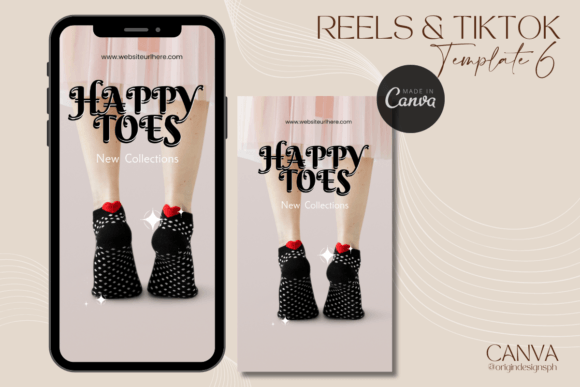
So, what exactly does Template6 look like, and why does it work? Visually, this template balances high energy with clean readability. It avoids the cluttered, chaotic look of amateur edits. Instead, it utilizes a structured grid that guides the viewer's eye from the hook to the call to action. The aesthetic leans into modern typography and sharp motion graphics. It feels contemporary, professional, and adaptable. Whether you are a graphic designer showcasing a portfolio piece, a marketer breaking down a complex strategy, or a crafter showing off a DIY project, the visual personality of Template6 adapts to your content without overshadowing it.
The "personality" of this video template is one of confidence. It doesn't scream for attention with cheap tricks; it earns attention through quality. Because it is built within Canva, it acts as a versatile design asset that respects the principles of visual hierarchy. The text areas are placed to maximize impact, ensuring that even on a small mobile screen, your message is clear. This is crucial for social media graphics where the window of opportunity to catch a user's thumb is measured in milliseconds.
Practical Applications for Designers and Entrepreneurs
One of the biggest challenges in content creation is maintaining brand consistency. When you use generic stock footage or random editing apps, your visual identity often gets lost. With Canva Reels TikTok Shorts-Template6, you have a canvas that supports your brand identity. You can easily swap out the default color palette for your own brand colors, upload your specific font pairing, and insert your logo. This transforms the template from a generic video into a specific piece of brand identity collateral.
Let’s look at how different professionals can leverage this tool:
- For Small Business Owners: Use this for product launches. The MP4 format allows for smooth transitions that can highlight features of a physical product, perfect for packaging design reveals or "unboxing" style content.
- For Bloggers and Publishers: Drive traffic to your latest article. Use the text overlay features to list "3 Reasons to Read..." This is far more engaging than a static link post and works wonders for editorial design promotion.
- For Content Creators and Influencers: If you are building a personal brand, consistency is key. Using the same transition style and layout in Template6 helps your audience recognize your content instantly as they scroll through their feed.
The Role of Typography in Video
Since we are talking about a template that relies heavily on text overlays, we need to discuss the typeface choices. A video template lives or dies by its typography. If the text is hard to read, the message fails. Template6 uses bold, clean sans serif font styles for headers to ensure maximum legibility against moving video backgrounds. This is a critical aspect of web design and video editing—contrast and clarity.
While the template provides the structure, you have the freedom to experiment. If your brand leans more traditional, you might swap the headers for a sturdy serif font. If you are in the beauty or lifestyle industry, you might introduce a script font or handwritten font for accents, though you should always be careful with readability. The template is designed to handle these changes gracefully. By adjusting the visual hierarchy—making the main point large and bold, and the details smaller—you guide the viewer through the story you are telling.
Maximizing Your Workflow and Licensing
Time is money, especially for freelancers and entrepreneurs. The beauty of a video template like this is the speed of execution. Instead of spending four hours editing a 15-second clip, you can spend 15 minutes customizing a pre-built structure. This allows you to focus on the strategy and the content itself rather than the technical mechanics of video editing.
When evaluating if Canva Reels TikTok Shorts-Template6 is the right fit for your next project, consider the tone of your message. This specific template style works best for educational content, product showcases, and announcements. It provides a professional polish that can elevate a hobbyist to look like a professional agency. It is a creative font and motion toolkit that bridges the gap between amateur phone editing and professional production.
Regarding usage, always review the commercial licensing provided in your welcome packet. If you are creating content for a client as a freelancer, or if you are a publisher creating assets for a brand, you need to ensure your usage rights are clear. The instructions included with the template will clarify how you can use the final rendered MP4s in your commercial projects.
Final Thoughts on Execution
Ultimately, tools like Canva Reels TikTok Shorts-Template6 are about removing barriers. They allow crafters, designers, and marketers to compete in a crowded digital space without needing a film degree. By leveraging high-quality design assets and understanding how to manipulate them within Canva, you can maintain a consistent, high-energy presence on TikTok and Reels. Don't let the technical side of video stop you from sharing your message. Open the template, make it yours, and start publishing.