Simplify Your Payroll Process with a Professional Pay Stub
For any small business owner, freelancer, or HR manager, the end of a pay period can bring a familiar sense of administrative dread. Calculating hours, factoring in deductions, and ensuring every employee and contractor receives an accurate record of their earnings is a critical, yet often time-consuming, task. A disorganized payroll process doesn't just waste time; it can lead to errors, frustration, and a less-than-professional impression on your team. The solution lies in creating a system that is both efficient and clear, turning a chore into a seamless part of your business operations.
The Anatomy of a Clear Earnings Statement
A well-designed employee pay stub is more than just a piece of paper; it's a vital communication tool. It provides a transparent breakdown of earnings and deductions, fostering trust and giving your team the information they need to manage their personal finances. A professional template ensures this document is not only accurate but also easy to read and understand at a glance.
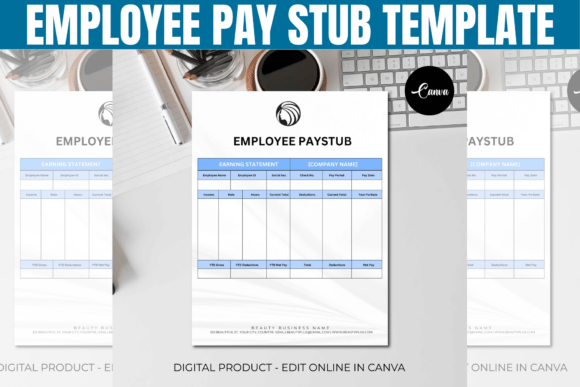
Imagine a pay stub with a clean, logical layout. At the top, your company's logo and contact information sit alongside the employee's details and the pay period dates. The body is divided into clear sections: Gross Pay shows total earnings before any deductions, followed by a detailed list of Deductions for taxes, insurance, and retirement contributions. The Net Pay—the final take-home amount—is highlighted for quick reference. Crucially, a Year-to-Date (YTD) column provides a running total, helping employees track their annual earnings and deductions without needing to gather old pay stubs. This structured approach eliminates confusion and answers common questions before they're even asked.
Where a Customizable Template Becomes Your Secret Weapon
The real power of a modern pay stub solution is its flexibility. A static, one-size-fits-all document rarely meets the diverse needs of a growing business. An editable template, particularly one built in a platform like Canva, transforms the pay stub from a generic form into an extension of your brand identity.
Think about the practical applications. You can easily adjust the template to accommodate bi-weekly, weekly, or monthly pay periods. For a freelancer paying a contractor, you can add a line item for a specific project fee. For a small business with part-time employees, you can modify the hours and pay rate sections without reformatting the entire document. This level of customization means the template works for you, not the other way around. Furthermore, by adding your company's colors, logo, and font, you create a consistent brand identity across all internal documents, reinforcing professionalism from offer letter to final paycheck.
Streamlining Your Workflow from Payday to Record-Keeping
Adopting a professional employee payroll system has benefits that extend far beyond a single pay period. It creates a ripple effect of efficiency and organization throughout your business. Here’s how a dedicated template streamlines your workflow:
- Time Savings: Instead of building a document from scratch every pay cycle, you simply update the numbers. This can save hours of administrative work each month.
- Reduced Errors: A consistent format minimizes the risk of omitting crucial information or making calculation mistakes in the layout itself. You can focus on verifying the data, not designing the form.
- Digital and Print Ready: Generate a PDF to email directly to your team or print for physical records. This flexibility supports both modern remote workflows and traditional filing systems.
- Enhanced Professionalism: A polished, branded earnings statement signals to your employees and contractors that you run an organized, credible business. It's a small detail that contributes significantly to overall brand perception.
Ultimately, a great pay stub template is a foundational design asset. It’s not about flashy graphics; it’s about functional, clear design that serves a critical business purpose. By investing a small amount of time in setting up an editable system, you reclaim countless hours in the future, reduce stress for yourself and your team, and build a more professional operational backbone for your business. It’s a practical step that pays dividends in clarity, efficiency, and trust.