One Photo Birthday Invitation: Simple, Stunning DIY
There’s a special kind of pressure that comes with designing a birthday invitation. You want it to feel personal, look polished, and capture the excitement of the celebration—all without spending a fortune or hours wrestling with complicated design software. That’s where the One Photo Birthday Invitation template steps in. It’s not just a design asset; it’s a practical solution for anyone who wants to create a beautiful, custom invite with minimal fuss.
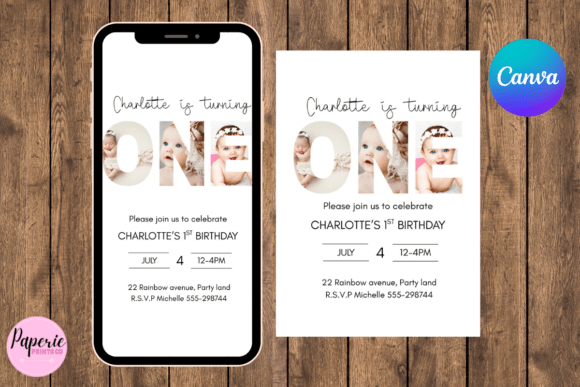
At its core, this is a self-editable Canva template that puts you in control. Once you purchase, you receive a simple PDF with two direct links: one for a printable invitation and another optimized for digital sharing. The beauty lies in its simplicity. You’re not starting from a blank canvas. Instead, you’re working with a professionally designed layout that’s built around a single, powerful photo. This focus creates a clean, modern aesthetic where your image does the heavy lifting, complemented by tasteful typography and a balanced composition.
How It Works: Your Invitation, Your Way
The process is designed to be intuitive, even if you’ve never used Canva before. After downloading the PDF, you click the link that fits your need. If you don’t have a Canva account, creating one is free and takes just a moment. From there, the template opens directly in your Canva workspace. You’ll find placeholder text that you can easily replace with your party details—the honoree’s name, the date, time, and location. The fonts and colors are editable, so you can tweak them to match a theme or your personal style. It’s about having a professional starting point that you can personalize in minutes.
When it’s time to finalize, the download options are straightforward. Click “Share” in the top right corner of Canva, then “Download.” For physical invitations you plan to print at home or at a print shop, PDF or PNG format is recommended. These formats preserve the quality and sharpness of the design. If you’re sending the invite digitally—via text message, email, or social media—PNG or JPEG are your best choices. They’re universally viewable on phones and computers without requiring special software. A practical tip for home printing: using a heavier cardstock, like 110lb, gives your invitation a substantial, professional feel that standard printer paper just can’t match.
Where This Template Shines: Real-World Applications
The strength of the One Photo Birthday Invitation template is its versatility. It’s a tool that adapts to the project, not the other way around. For a child’s birthday party, that one central photo can be a candid shot from the playground, a funny face, or a proud moment with a favorite toy. For an adult milestone celebration, it could be a stylish portrait or a meaningful snapshot that sets the tone for the event. The design supports the story you want to tell.
This approach is particularly effective for several types of creators and businesses:
- Parents and Party Planners: Quickly produce something that looks like it came from a boutique stationery shop, without the associated cost or lead time.
- Small Business Owners: Host a customer appreciation event or a grand opening. Using a professional template reinforces brand consistency and attention to detail in your brand identity.
- Content Creators and Bloggers: Organize a meet-up, workshop, or subscriber event. A clean, visually-driven invitation is perfect for sharing on social media graphics and can help drive engagement.
- Designers and Marketers: Use it as a case study or a quick client solution. It’s a great example of how a modern typography layout and a strong visual anchor can communicate an event’s vibe instantly.
Design Observations and Practical Guidance
From a design perspective, this template leverages a few key principles. The single-photo layout creates an immediate focal point, which is excellent for visual hierarchy. Your eye goes right to the image, then to the essential details. The typography choices in the template are likely a clean sans serif font for readability, possibly paired with a more expressive script font for the headline. This kind of font pairing adds personality without sacrificing clarity.
When you’re editing, consider these tips:
- Choose Your Photo Wisely: Since it’s the star, select a high-resolution image with good lighting. A photo with some negative space around the subject often works best, allowing the text to be placed without clutter.
- Test Your Wording: Keep the details concise. Canva’s text boxes are flexible, but the template’s design works best when you don’t overcrowd it. Use the bold or italic features for emphasis on key information like the RSVP date.
- Evaluate the Fit: This template is ideal for casual to semi-formal celebrations. Its style is contemporary and friendly, making it a great fit for birthdays, casual gatherings, and creative events. For a black-tie gala, you might seek a different typeface and layout, but for most birthday scenarios, it hits the mark perfectly.
- Understand the Licensing: As a commercial font and design asset included in the template, you have the rights to use the final invitation for personal and commercial purposes, like promoting a business event. This removes a common hurdle for small business owners.
The real value of a template like One Photo Birthday Invitation is that it bridges the gap between a generic, store-bought card and a fully custom design commission. It gives you the framework of good editorial design—balance, proportion, and style—while leaving room for your unique touch. It’s a practical piece of your design assets toolkit, ready to be deployed whenever you need to celebrate something important, simply and beautifully.